
使用 PNPM 的情况下,Jest 解决 ESM 依赖库的报错问题
Environment
- NX
- PNPM
- lodash-es
- Jest
Error encountered when migrating from Karma to Jest
The main reason is that ESM (ECMAScript Modules) libraries in node_modules are not supported by Jest.
Given that Jest’s ESM support is still in an experimental and nearly unusable stage, and I’m mainly migrating company projects to Jest, this post focuses on using transformIgnorePatterns and moduleNameMapper to resolve the issue.
Test suite failed to run

Jest encountered an unexpected token

Jest failed to parse a file. This happens e.g. when your code or its dependencies use non-standard JavaScript syntax, or when Jest is not configured to support such syntax.

Out of the box Jest supports Babel, which will be used to transform your files into valid JS based on your Babel configuration.

By default "node_modules" folder is ignored by transformers.

Here's what you can do:
    • If you are trying to use ECMAScript Modules, see https://jestjs.io/docs/ecmascript-modules for how to enable it.
    • If you are trying to use TypeScript, see https://jestjs.io/docs/getting-started#using-typescript
    • To have some of your "node_modules" files transformed, you can specify a custom "transformIgnorePatterns" in your config.
    • If you need a custom transformation specify a "transform" option in your config.
    • If you simply want to mock your non-JS modules (e.g. binary assets) you can stub them out with the "moduleNameMapper" config option.

You'll find more details and examples of these config options in the docs:
https://jestjs.io/docs/configuration
For information about custom transformations, see:
https://jestjs.io/docs/code-transformation
The following examples use lodash-es as reference.
transformIgnorePatterns
From the official docs: an array of regex pattern strings that are matched against all source file paths before transformation. If a file path matches any pattern, it will not be transformed.
In other words, transformIgnorePatterns specifies which files or folders should be ignored during transformation.
In the default NX Jest config, it is set to node_modules/(?!.*\.mjs$).
This means it matches paths starting with node_modules/, but excludes those ending in .mjs. ?! is a negative lookahead.
transformIgnorePatterns: ['node_modules/(?!.*\\.mjs$)'],This configuration will transform .mjs files from ESM to CommonJS to support Jest.
Add lodash-es transform
Also supports PNPM:
const esModules = ['.*\\.mjs$', 'lodash-es'].join('|');

export default {
    ...
    transformIgnorePatterns: [`node_modules/(?!.pnpm|${esModules})`],
    ...
}
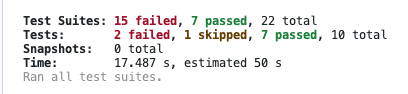
After the transform, failed tests dropped from 15 to 11, but the transform adds cost and took ~51s. After the first run it seems to cache and no longer needs re-transforming.

A cheaper approach: moduleNameMapper
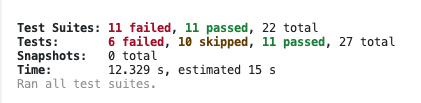
This approach requires the library to have a CommonJS build, so no transform is needed. It can run in ~12s.
export default {
    ...
    moduleNameMapper: {
        '^lodash-es$': 'lodash',
    },
  ...
}
Final config reference
/* eslint-disable */
const esModules = ['.*\\.mjs$'].join('|');

export default {
  displayName: 'pc',
  preset: '../../jest.preset.js',
  setupFilesAfterEnv: ['<rootDir>/src/test-setup.ts'],
  coverageDirectory: '../../coverage/apps/pc',
  moduleNameMapper: {
    '^lodash-es$': 'lodash',
  },
  transform: {
    '^.+\\.(ts|mjs|js|html)$': [
      'jest-preset-angular',
      {
        tsconfig: '<rootDir>/tsconfig.spec.json',
        stringifyContentPathRegex: '\\.(html|svg)$',
      },
    ],
  },
  transformIgnorePatterns: [`node_modules/(?!.pnpm|${esModules})`],
  snapshotSerializers: [
    'jest-preset-angular/build/serializers/no-ng-attributes',
    'jest-preset-angular/build/serializers/ng-snapshot',
    'jest-preset-angular/build/serializers/html-comment',
  ],
};