
Hexo: Output Posts by Category
Nexmoe April 15, 2021
This article is an AI translation and may contain semantic inaccuracies.
This article shows how to output posts under a specific category in Hexo.
Questions answered
https://www.zhihu.com/question/404351568
https://segmentfault.com/q/1010000017758828
Preface
The official helper function list_categories isn’t enough, so I used the categories variable directly.
I haven’t learned Node.js, so this is mostly trial and error.
I first logged site.categories.data with console.log(). It looks like this:
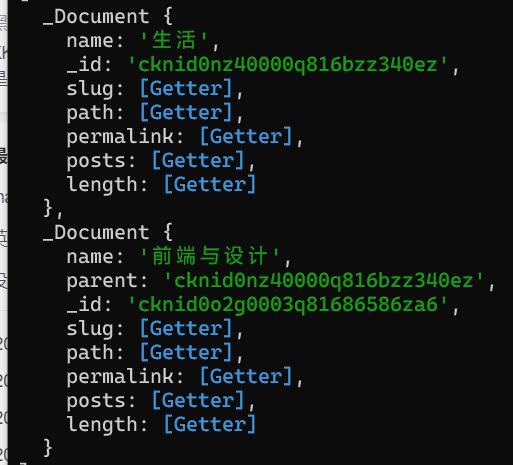
After some tinkering, I found this object is used via map().
Output category titles
<% site.categories.map(function(category){  %>
    <h1><%= category.name %></h1>
<% }) %>
Output post titles
<% site.categories.map(function(category){  %>
    <h1><%= category.name %></h1>
    <% category.posts.map(function(post){  %>
		<h2><%= post.title %></h2>
    <% }) %>
<% }) %>| Variable | Description | Type |
|---|---|---|
post.title | Page title | string |
post.date | Page creation date | Moment.js |
post.updated | Page update date | Moment.js |
post.comments | Whether comments are enabled | boolean |
post.layout | Layout name | string |
post.content | Full page content | string |
post.excerpt | Page excerpt | string |
post.more | Content after the excerpt | string |
post.source | Original source path | string |
post.full_source | Full original source path | string |
post.path | Page URL (without root path). Often used as url_for(post.path) in themes. | string |
post.permalink | Full page URL | string |
post.prev | Previous page. null if this is the first page. | string or null |
post.next | Next page. null if this is the last page. | string or null |
post.raw | Raw post content | ??? |
post.photos | Post photos (for albums) | array |
post.link | External link (for link posts) | string |